Microsoft : Windows 7

Start using your PC the way you want — with less waiting, less clicking and fewer hassles. Experience it yourself. Windows 7 is an Operating System of Microsoft Windows, produced by Microsoft for use on personal computers.

TechSupp247

Do you need a quick solution to a technical problem? With our live remote-assistance tool, a member of our support team can view your desktop and share control of your mouse and keyboard to get you on your way to a solution.

Microsoft Windows 7

Windows 7 is the latest release of Microsoft Windows, a series of operating systems produced by Microsoft for use on personal computers.

Microsoft Windows 7

Windows 7 is the latest release of Microsoft Windows, a series of operating systems produced by Microsoft for use on personal computers, including home and business desktops, laptops, netbooks, tablet PCs, and media center PCs.

Microsoft Windows 7

Windows 7 changes the Vista user interface; most notably, a new taskbar, called the "Superbar," is similar to the Dock in the Mac.

Showing posts with label Registry Editor. Show all posts

Thursday, July 7, 2011

Windows 7 Tips

Hide Drives from Your Computer in Windows 7 or Vista


If you’ve got drives in My Computer that you never access, such as a USB Flash drive that you are using solely for ReadyBoost, a floppy drive, or a network drive only used for a particular piece of software, then you might want to simply hide the drive from your computer.

Saturday, April 30, 2011

Windows 7 Tips


Prevent Changing Wallpaper Using a Registry Hack


Sometimes you might not want users to have the ability to change Wallpaper on Windows 7 workstations. Today we look at how to prevent them from changing.

Wednesday, April 13, 2011

Windows 7 Tips

Create Administrator Mode Shortcuts Without UAC Prompts in Windows 7 or Vista


Create the Scheduled Task Item

Open up Task Scheduler through the start menu search box (usually you can just type task), and then on the right-hand side click the “Create Task” link:

Friday, January 28, 2011

Reduce recent items in Windows 7


       Recent Items is a list of your recently used files on the right side of the Start Menu, Taskbar Windows Explorer icon link, in the Navigation Pane Recent Places, and in Jump Lists in Windows 7. If you’ve ever wondered how to configure the number of documents shown on the Recent Items menu, you’ve found the right article for Windows 7. The default value is set to show 10 documents, but you can increase that with a registry tweak.

Thursday, January 13, 2011

Prevent Access to Registry Editor

Registry is a place where we can edit all the settings on the system including adding the Administrator Account in the log in page. It is a very important tool to make changes to the system be it XP, Vista or windows7.
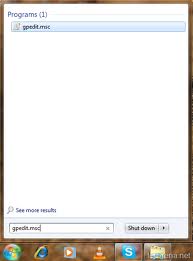
Step 1: Open the Group Policy Editor by typing gpedit.msc in the search box or in the Run command
Step 2: It will open the Local Group Policy Editor
Step 3: Expand the User Configuration and Administrative Template
Step 4: Select System and double click on the option prevent access to Registry editing tools
Step 5: It will open a window like this


Step 6: Select Enable option and click on Ok to select disable it.
Step 7: If you want to Enable registry Editor we need to Select Disable option again to re enable it.
This can be used in windows Xp computer as well.

Related Posts Plugin for WordPress, Blogger...

Search This Blog

Followers

Twitter Delicious Facebook Digg Stumbleupon Favorites More