
Microsoft : Windows 7

Start using your PC the way you want — with less waiting, less clicking and fewer hassles. Experience it yourself. Windows 7 is an Operating System of Microsoft Windows, produced by Microsoft for use on personal computers.

TechSupp247

Do you need a quick solution to a technical problem? With our live remote-assistance tool, a member of our support team can view your desktop and share control of your mouse and keyboard to get you on your way to a solution.

Microsoft Windows 7

Windows 7 is the latest release of Microsoft Windows, a series of operating systems produced by Microsoft for use on personal computers.

Microsoft Windows 7

Windows 7 is the latest release of Microsoft Windows, a series of operating systems produced by Microsoft for use on personal computers, including home and business desktops, laptops, netbooks, tablet PCs, and media center PCs.

Microsoft Windows 7

Windows 7 changes the Vista user interface; most notably, a new taskbar, called the "Superbar," is similar to the Dock in the Mac.

Showing posts with label Wordpad. Show all posts

Thursday, March 24, 2011

Windows 7 Features


New Features in WordPad


WordPad and Paint are often overlooked accessories included in all versions of Windows since 95. They are still included in Windows 7 and now have a new look with some enhanced features. Here we will take a look at some of the new improvements.

Classic WordPad

WordPad has always come in very handy as a quick and easy to use text editor for documents. Rather than opening up a new Word session to make simple adjustments, WordPad can save a lot of time. In fact it is all some users need to create basic letters and and other simple documents.


WordPad 6.1 w/ Ribbon UI

The new WordPad in Windows 7 includes the nicely laid out Ribbon interface which has been a feature in Office 2007 and in the forthcoming 2010. If you are new to the Ribbon, it does take getting used to, but once you do, you’ll wonder how you did without it before.
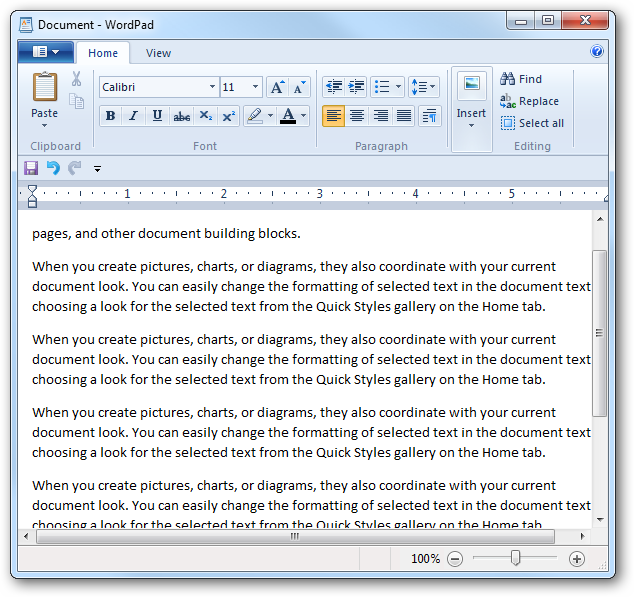


To access commonly used commands easier, just Right-click the button and choose “Add to Quick Access Toolbar”.


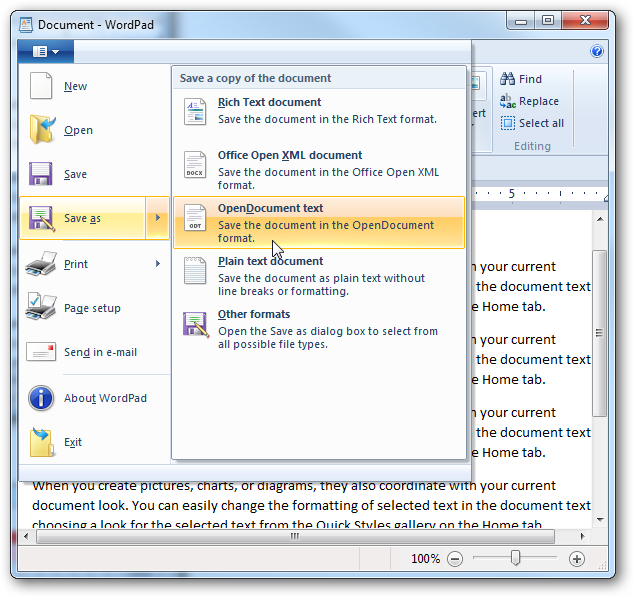
What may be considered the coolest new feature, it includes the ability to read and write documents to Office Open XML format, which supports Open Office (.odt) and IBM Lotus Symphony suites.


Like in pervious versions you can insert a Paint drawing.


Related Posts Plugin for WordPress, Blogger...

Search This Blog

Followers

Twitter Delicious Facebook Digg Stumbleupon Favorites More